
TL;DR: We have built and open-sourced Buffrs , Helsing’s package manager for protocol buffers. In this two-post series, we first explained why we built Buffrs and how it works (see the previous post ), and now provide a step-by-step getting started tutorial (this post).
Imagine we are building a sensor data management platform for embedded devices. The API for our platform use protocol buffer messages for measurements such as temperature , pressure, location , sensor reading that are widely shared by many different services and clients.
As explained in the first blog post, a common challenge with protocol buffer APIs is the distribution and dependency management problem for API definitions, in particular for APIs with many different consumers and users. Concretely, if we maintain the protocol buffer files in a Git repo, then how can other repositories be kept up to date with API changes in a safe and convenient way?
We will see in this blog post how Buffrs enables us to maintain and distribute organisation-wide domain libraries as a basis for API specifications. We are going to create a shared protocol buffer library (units), an API definition for a sensor service that uses types from units, and finally a gRPC server that implements the sensor service.
Using Buffrs
The sensor data management platform has three components:

In the following, we are taking a step by step look on how to wire these together using Buffrs. To get started, install Buffrs with cargo install buffrs. We assume that you have access to a JFrog Artifactory registry; please log in with buffrs login.
Units Library
Let’s start by defining our domain-specific units library. The buffrs init --lib units commands creates an empty skeleton Buffrs project as follows:
units
├── Proto.toml
└── proto
    └── vendor
Proto.toml contains the baseline of information about this library:
[package]
type = "lib"
name = "units"
version = "0.1.0"
We can now define the library’s message types in proto/temperature.proto:
syntax = "proto3";
package units;
// Temperature in Celsius
message Celsius
// Temperature in Fahrenheit
message Fahrenheit
// Temperature in Kelvin
message Kelvin
// A temperature
message Temperature
Finally, the buffrs publish --repository physics command packages the library and publishes it to the configured registry. It collects all .proto files within the proto directory (ignoring vendored protocol buffers located under proto/vendor), adds the manifest, and packages everything into the Buffrs Package Format, a gzipped tar file with the following simple layout:
Proto.toml
temperature.proto
This package is then uploaded to the specified Buffrs registry under the fully qualified package name, /physics/units/units-0.1.0.tgz .
Sensor API
In the Sensor API project, we start by declaring a dependency on the units library as follows:
The buffrs add commands adds the dependency to the Proto.toml manifest, and buffrs install downloads the Buffrs packages from Artifactory and unpacks them into proto/vendor/<package>.
Next, we write the Sensor API RPC definitions in sensor.proto; we can use the types from the units library by importing them:
= ;
;
;
;
//
//
//
As above, we finally publish the Sensor API via buffrs publish --repository iot into a /iot/sensor-api/sensor-api-0.1.0.tgz registry artifact.
Sensor Server
The prior steps enable us to consume the sensor-api package and implement the server in Rust – Starting with a cargo project that produces a sensor-server binary with the following (default) structure:
sensor-server
├── Cargo.toml
└── src
    └── main.rs
We can initialise the project, and then add and install the sensor-api package using:
The buffrs install command traverses the dependency tree and installs all required direct and transitive dependencies of declared packages. Installing iot/sensor-api thus results in also installing its dependency on physics/units.
Now we can add the buffrs crate as build and application dependency in Cargo.toml. We will also use tonic and prost in order to implement a gRPC server:
[package]
name = "sensor-server"
version = "0.1.0"
edition = "2021"

[dependencies]
tonic = "0.9"
prost = "0.11"
prost-types = "0.11"
buffrs = { version = "0.5", default-features = false }

[build-dependencies]
buffrs = { version = "0.5", features = ["build"] }
The Buffrs/Cargo integration is a one-liner in build.rs:
This first downloads all missing Buffrs dependencies and then runs the language specific code generator. In the case of Rust this wraps tonic-build. Of course you can also opt out and run a custom code generation tool.
The application code can now inline the generated code using buffrs::include! or the (alternatively the std-only approach described in the crate documentation):
;
Et voila — you have a running server for the Sensor API, based on protocol buffers packages and dependencies managed by Buffrs. Of course this was a toy example, but we hope it served as a step-by-step guide for creating and using protocol buffer packages with Buffrs.
Summing up
Buffrs shines as soon as APIs and dependencies become more complex than in this toy example. Say we add a second service that also uses messages from the units library:
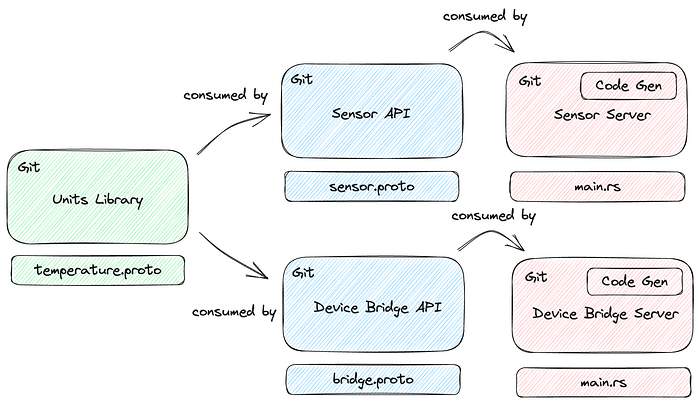
This new device bridge API can now take the full advantage of the existing libraries (units) and reuse their common types. This has a couple of nice side effects:
Reduced complexity. Through reusing existing types the amount of messages required to type a new API is drastically reduced as the library ecosystem grows.
Common flavour. Using libraries guides engineers to reuse common data formats (eg, the Temperature message when talking about temperature measurements). This enables using the output of one server as the input for another and and promotes a common API flavour.
Wire compatibility. When using the same underlying Buffrs library your APIs are compatible (even with diverging library versions!) through the wire compatibility guarantees that protocol buffers bring to the table.
Looking Ahead
Buffrs is still in its infancy and as such we had to prioritise what we build first in order to provide the most value to Helsing’s engineers and the open source community. This leaves us with room to improve in two important directions:
Language support. This tutorial is focused on Rust as it is the main language at Helsing. Buffrs is designed to be language-agnostic and thus aims to integrate with common build tools for all sorts of languages. The next two languages we aim to provide integrations for are Python and TypeScript. Until then, Buffrs is still a useful tool for dependency management: (1) add and install Buffrs packages via the CLI, (2) check in the vendored dependencies via git/SCM, (3) use your preferred build system to compile the checked in protocol buffer files.
Buffrs registry. We use Artifactory internally and thus started with an Artifactory-based Buffrs registry. In order to make Buffrs useful for organisations that do not use Artifactory, we are considering building a self-hostable, blob-store-backed (think S3) registry.
We would be happy to hear your thoughts and feedback; pull requests are always welcome! Buffrs is available under the Apache License 2.0 at https://github.com/helsing-ai/buffrs/ .
Author: MaraS